Butcher Hero FAQ
Butcher Hero offers Cloud Saves in Profile, Play Offline for disconnected sessions and Unstuck in Settings. Players also report crashes and freezes. Start with the question that matches the screen or message you see, then follow the game's specific instruction.
Crashes and Frozen Screens
Why does Butcher Hero keep crashing after I die?
Players report crashes after death, including a repeat crash when returning to the game and dying again. That describes an experience rather than a cause. Restart the game, check for an update through the official store, and inspect Cloud Saves in Profile. If the crash returns at the You died screen, tell support exactly when it happens. Check the release history.
What can I try when the game freezes?
Players report freezes and phone lockups. Restarting gives you a chance to reopen Settings and check Graphics, which offers different quality levels. You can try a lower quality selection, but the game does not promise that this resolves a freeze. Check the store for updates and review your Cloud Save status before making further changes. Send recurring problems to support. Find the official download options.
Which graphics controls can I check?
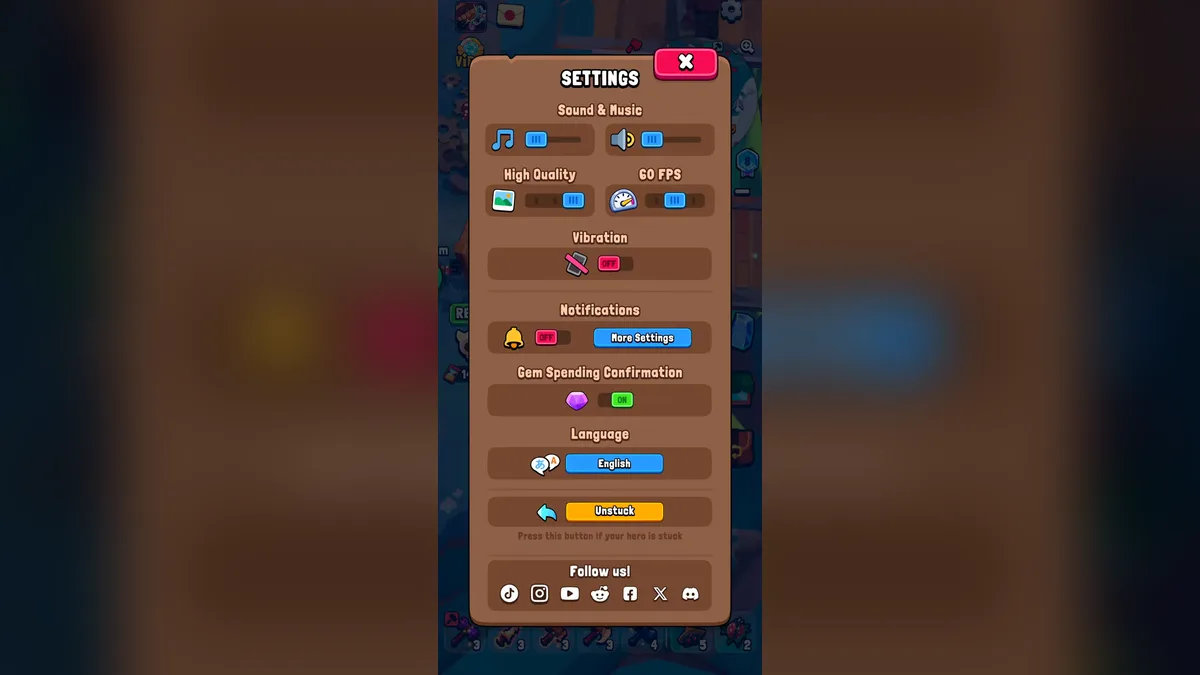
Settings includes Graphics, with Low Quality, Medium Quality, High Quality, Super High Quality choices. These are visual settings, so treat a quality change as an option to try rather than a guaranteed repair. If the same fight still freezes after restarting, include the chosen quality in your support message. Keep the account signed in through Profile so you can also review the Cloud Saves messages.
Saves and Account Progress
How do I turn on Cloud Saves?
Open Profile and sign in through Google Play Games or Game Center. The game uses that sign in to store your progress in the cloud. Do this before depending on progress across devices, and read any Cloud Saves warning that appears afterward. A connection warning, a version warning and a save conflict each ask for a different action.
What should I do if my progress is missing?
When the game rejects a local save, it says it will attempt to recover progress using Cloud Save. Follow that recovery message and contact support if it keeps happening. Describe what you see in Profile and the point where progress appears to change. Keep a lost progress report separate from an ordinary You died screen, which describes a combat defeat.
Which save should I keep when a conflict appears?
Read the choices carefully and select the save you want to continue using. The conflict warning says the unused save will be permanently replaced. If the game instead says a different cloud save exists and asks for a restart, restart to bring up that choice. Do not select a save just to dismiss the window, because this decision replaces the alternative.
Why does Profile say Cloud Saves are disabled?
Read the rest of the message before acting. A cloud error tells you to restart the game. A newer version warning means another device has already used a more recent release, so update the older device before using its cloud features again. These are separate messages with separate instructions. Repeated errors belong in a support request with the displayed warning included.
How do I move my account to another phone?
Use the Cross-Platform Password for the account transfer. Save it as soon as the game displays it, because that password appears only once. Generating a replacement makes the previous password stop working. The game warns that this password provides full account access, so keep it private. Check Profile and the Cloud Saves messages when preparing to use the new phone.
Ads and Shop Purchases
What does the No Ads purchase include?
The No Ads description says it removes all ads and lets you claim stat offers for free. The US App Store lists it at $29.00. Check the price displayed on your own purchase screen before accepting. That named product describes ad removal; use the VIP Privileges window when you want to inspect VIP rewards and account bonuses. Compare the VIP perks.
Do I have to watch ads to continue?
The release history says forced ads were removed and rewarded ads became a choice. A later update also removed the banner. You can decide if an offered reward is worth watching an ad for. No Ads is the shop option whose description removes ads and makes stat offers free to claim. Read the specific offer on screen before choosing a reward.
Who should I contact about a purchase problem?
Use the support email listed below and describe the purchase and the problem you see. State if the issue concerns No Ads, a stat offer or a different shop product, so the report identifies the affected feature. The No Ads description promises ad removal and free stat offers. For a VIP question, include the perk shown in VIP Privileges rather than assuming the products behave alike.
The video, Butcher Hero settings, profile and Cloud Saves screens after update 2.1, shows the Settings and Profile windows alongside Cloud Saves. Use those screens to locate the controls discussed in these answers.
Offline Play and Connections
Can I play Butcher Hero without internet?
Yes. The game offers Play Offline, and Google Play describes offline single player play. Use that option when you want to continue without a connection. Cloud Saves uses a sign in through Profile, so inspect its status once you reconnect. For installing the game or checking the store version, use the official store links on the download page rather than an unofficial copy.
What does Limited Mode mean?
After losing its connection, the game says it will continue in Limited Mode. The same message tells you to restore internet access to regain Full Access. Follow that instruction when you need the connected features again. Keep the precise message in mind when reporting a problem: Limited Mode describes a connection state, while a Cloud Saves error provides its own restart or update instruction.
Settings and Getting Unstuck
Where is the Unstuck button?
Open Settings and look for Unstuck. Its own description tells you to press it when the hero is stuck. That makes it the relevant control when scenery blocks movement, rather than a Cloud Saves action. If you are searching around a hidden chest, record the location before using it so you can explain the problem if it returns. Look up the chest route.
Can I change the game language?
Yes. Settings contains a Language control. Open it when you want to choose the language used by the interface, then check that the menu text is readable before continuing. When asking for help, include the exact message shown in your selected language. A Language selection is separate from Graphics and from the account controls in Profile, so check the relevant window for each issue.
Is Unstuck a fix for crashes or lost saves?
The game describes Unstuck as a button for a hero who cannot move. Use the Cloud Saves instructions for missing progress, and report repeated crashes to support with the action that caused them. Keeping those cases separate helps you choose the control the game actually offers. If the hero can move but a window shows an error, follow that message instead of treating it as a scenery problem.
Contacting the Support Team
What is the Butcher Hero support email?
Google Play lists support@multicastgames.com as the support email. In your message, describe the affected screen and the action immediately before the problem. Include the exact warning, such as Limited Mode or the Cloud Saves restart message. For a repeat freeze, explain where it happens and which Graphics option you used. Keep your Cross-Platform Password out of the message because it grants account access.
Gameplay Questions and Guides
What should I change after losing a Boss Tower fight?
The Boss Tower retry message tells you to improve stats or change equipment before trying again. Use that instruction to reconsider your current setup rather than repeating the same fight without changes. A You died screen is a combat result; an app closing after it is a separate crash report. New players can review how permanent growth and equipment fit together before another attempt. Review the beginner guide.
Where should I look for hidden chest help?
Use the chest guide when the obstacle is finding a secret chest or reaching its location. Keep that search separate from shop chests and from the VIP Daily Chest, since the names refer to different rewards. If movement stops while you explore a tight spot, Settings has Unstuck. If progress disappears after reopening the game, return to the Cloud Saves questions above. Browse the hidden chest locations.
Where can I check redeem codes and free rewards?
Visit the codes page for the current code list and its redemption guidance. For other rewards, look at the named feature that provides them, such as secret chests or VIP Daily Chest. A code question does not require sharing your Cross-Platform Password with anyone. Keep account transfer credentials private even when someone offers help with rewards or asks to inspect your account. See the code list.